

 |
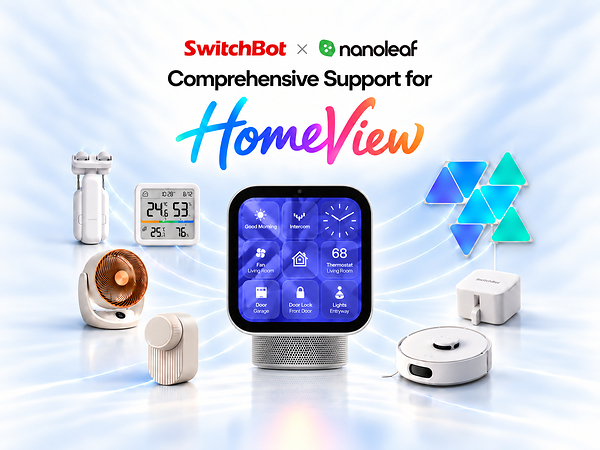
TOKYO, Oct. 14, 2026 /PRNewswire/ — Joining forces, SwitchBot and Nanoleaf today announced a dedicated smart home experience featuring compatible SwitchBot and Nanoleaf devices via Apple HomeView. The experience demonstrates how products from both brands can come together through Apple HomeView for more connected living, room by room.

SwitchBot and Nanoleaf for Apple HomeView

Through Apple HomeView, users can control compatible curtains, blinds, locks, lights, appliances, and other devices, check the status of their home, and create scenes that bring products from both brands into a single routine. With the introduction of Apple HomeView, supported accessories and saved scenes already connected to Apple Home can also be accessed from a shared home display.
One Device. Just Ask.
Once compatible SwitchBot and Nanoleaf products have been added to Apple Home, Apple HomeView brings their everyday controls together on one shared display. Using HomeView’s touchscreen or Siri, users can open SwitchBot Curtain 3 in the bedroom, adjust SwitchBot Blind Tilt in a home office, turn compatible Nanoleaf lights on or off, or set supported lighting to a preferred brightness. Commands such as “Hey Siri, set the living room curtains to 50 percent” allow users to make adjustments through HomeView while cooking, working, relaxing, or getting ready for the day.
This Apple HomeView experience extends across multiple product categories. SwitchBot’s compatible lineup includes smart curtains and blinds, locks, sensors, meters, lighting, air-care products, switches, plugs, and selected robot vacuums, while Nanoleaf adds customizable smart lighting for functional and ambient illumination.
Know Without Checking in Person
Apple Home also gives users a convenient way to check what is happening around the home. Compatible SwitchBot meters can share indoor temperature and humidity information, while contact and water leak sensors provide useful status information for doors, windows, sinks, and laundry areas.
Users can ask Siri for the bedroom temperature, confirm whether the front door is locked, or check whether compatible lights are still on. Lock Vision and Lock Vision Pro offer native Matter over Wi-Fi integration for Apple Home control, allowing users to view lock status without requiring an additional SwitchBot bridge.
By bringing device information into Apple Home, users can keep track of different rooms from a familiar interface, whether they are checking indoor comfort, home security, or everyday device status.
One Scene. Multiple Devices.
Beyond individual device controls, Apple HomeView brings saved Apple Home scenes to a shared display, allowing compatible SwitchBot and Nanoleaf products to respond together with a tap or a Siri request. A Movie Night scene, for example, could close SwitchBot curtains while changing Nanoleaf lights to a chosen color and brightness. A morning scene could open the bedroom curtains and turn on selected lights, while an evening routine could close the curtains and switch off the lighting before bed.
Once a scene has been created and saved in Apple Home, users can activate it directly from Apple HomeView or say, “Hey Siri, activate Movie Night.” In this way, HomeView brings products with different functions into one coordinated, cross-brand home experience.
Native or via a Hub, Clearly Connected
Compatible SwitchBot and Nanoleaf devices can be added to Apple Home through different connection paths. Products with native Matter over Wi-Fi support, as well as selected HomeKit-enabled devices, can pair directly without an additional brand bridge. SwitchBot accessories that require bridging can instead connect through a compatible SwitchBot Matter Hub, such as Hub 3, Hub 2, Hub Mini Matter Enabled, or AI Hub, depending on the product.
Apple HomeView and SwitchBot Matter Hubs perform different roles: Apple HomeView supports functions such as remote access and automations, while SwitchBot Matter Hubs bring compatible SwitchBot accessories into Apple Home. Apple HomeView then provides a shared interface for accessories already connected to Apple Home, but does not replace a required SwitchBot Matter Hub.
Connected Living, Room by Room
To better help users set up and manage a connected home through Apple HomeView, SwitchBot and Nanoleaf have released an official guide covering compatible products, connection methods, setup instructions, and everyday operations. Organized around familiar spaces such as the living room, bedroom, entryway, home office, kitchen, bathroom, and laundry area, the guide shows how supported devices can be added to Apple Home and accessed from Apple HomeView as part of a connected, room-by-room experience.
Users can explore suggested product combinations, compare native and hub-based connection methods, and discover practical ways to use compatible devices through HomeView throughout the day. These examples range from opening bedroom curtains and checking the room temperature in the morning to viewing the front-door lock status after arriving home or activating a multi-device scene in the evening.
By connecting individual products with familiar household moments, the guide reflects SwitchBot and Nanoleaf’s commitment to making the connected home easier to understand, set up, and use, while giving users the flexibility to choose the devices that suit each room.
For more information, please visit the official guide provided by SwitchBot and Nanoleaf and follow SwitchBot on X, Instagram, Facebook, and YouTube.

